Firecrawl Research Patterns
Programmatic patterns for using self-hosted Firecrawl in research workflows — search, scrape, route academic papers, run recursive deep research, and persist raw results for future re-analysis. Also covers self-hosted deployment, health checks, and recovery.
For archiving AI chat conversations (ChatGPT/Gemini shares), see Skill(gh-tools:research-archival) .
FIRST — TodoWrite Task Templates
MANDATORY: Select and load the appropriate template before any research work.
Template A — Single Firecrawl Search + Persist
- Health check — GET http://172.25.236.1:3002/v1/health (fallback: test search)
- Execute search — POST /v1/search with query, limit, scrapeOptions
- Persist raw results — save each result page to docs/research/corpus/ with frontmatter
- Update corpus index — append entries to docs/research/corpus-index.jsonl
- Extract findings — summarize key learnings from raw corpus files
Template B — Academic Paper Retrieval + Persist
- Identify source — classify URL/DOI per academic-paper-routing.md decision tree
- Route to scraper — arxiv direct HTML, Semantic Scholar API, Firecrawl, or Jina Reader
- Scrape content — execute fetch with appropriate method and timeout
- Persist raw result — save to docs/research/corpus/ with academic-specific frontmatter
- Update corpus index — append entry to corpus-index.jsonl
- Summarize paper — extract key claims, methods, results from raw corpus file
Template C — Full Recursive Deep Research with Corpus
- Health check — verify Firecrawl reachable at 172.25.236.1:3002
- Initialize parameters — set breadth (default 4), depth (default 2), concurrency (default 2)
- Generate search queries — LLM generates N queries from topic + prior learnings
- Execute searches — Firecrawl /v1/search for each query via p-limit(concurrency)
- Persist raw results — save ALL scraped pages to docs/research/corpus/ with provenance
- Extract learnings — LLM extracts key findings + follow-up questions per result set
- Recurse — for each follow-up, recurse with breadth=ceil(breadth/2), depth=depth-1
- Base case — depth=0, return accumulated learnings
- Synthesize report — LLM generates final markdown from all learnings
- Write session report — save to docs/research/sessions/ with corpus file references
- Update corpus index — append all new entries to corpus-index.jsonl
Template D — Corpus Review / Re-Analysis
- Inventory corpus — read docs/research/corpus-index.jsonl, filter by session/topic/date
- Read raw files — load matching corpus files from docs/research/corpus/
- Re-analyze — extract new insights with current context/questions
- Update session report — amend or create new session report in docs/research/sessions/
Template E — Image-Rich Paper with Inline Figures
Use when paper contains architecture diagrams, result plots, attention maps, or any critical visual content.
- Scrape text — use port 3003 (preferred, preserves absolute image URLs) or Jina fallback
- Detect figures — scan scraped markdown for
patterns with .png/.jpg/.svg
- Extract figure URLs — for arXiv: probe https://arxiv.org/html/{id}v{n}/x{N}.png until 404
- Keep URLs inline — DO NOT rewrite to local relative paths (breaks GitHub rendering)
- Ensure inline embedding — markdown body must have
for each figure
- Catalog in frontmatter — add figure_count and figure_urls list (all absolute URLs)
- Save corpus file — GFM markdown with inline absolute URLs renders on GitHub without hosting
- Update corpus-index.jsonl — include has_figures: true, figure_count, figure_urls
Section 1 — Programmatic Firecrawl Usage
Instance: Self-hosted at http://172.25.236.1:3002 via ZeroTier. No API key needed.
Why fetch() Instead of @mendable/firecrawl-js SDK
The official SDK uses jiti for dynamic imports, which is incompatible with Bun's module resolution. Direct fetch() calls are simpler, more reliable, and have zero dependencies.
Two Endpoints
Endpoint Purpose When to Use
POST /v1/search
Search + scrape combo Research queries — returns multiple scraped pages
POST /v1/scrape
Single URL scrape Known URL — extract markdown from one page
See api-endpoint-reference.md for full request/response contracts.
Quick Examples
Search (returns multiple results with markdown):
const res = await fetch("http://172.25.236.1:3002/v1/search", { method: "POST", headers: { "Content-Type": "application/json" }, body: JSON.stringify({ query: "mixture of experts scaling laws", limit: 5, scrapeOptions: { formats: ["markdown"] }, }), }); const { data } = await res.json(); // data: [{ url, markdown, metadata }]
Scrape (single URL):
const res = await fetch("http://172.25.236.1:3002/v1/scrape", { method: "POST", headers: { "Content-Type": "application/json" }, body: JSON.stringify({ url: "https://arxiv.org/abs/2401.12345", formats: ["markdown"], waitFor: 3000, // ms — for JS-heavy pages }), }); const { data } = await res.json(); // data: { markdown, metadata }
Error Handling
// Always set a timeout const controller = new AbortController(); const timeoutId = setTimeout(() => controller.abort(), 15_000);
try {
const res = await fetch(url, { ...opts, signal: controller.signal });
if (!res.ok) throw new Error(Firecrawl: ${res.status} ${res.statusText});
const json = await res.json();
if (!json.data || (Array.isArray(json.data) && json.data.length === 0)) {
// Empty results — not an error, but no content to process
}
} finally {
clearTimeout(timeoutId);
}
Health Check
// Quick health check before starting a research session const res = await fetch("http://172.25.236.1:3002/v1/health"); if (!res.ok) throw new Error( "Firecrawl unhealthy — see self-hosted-operations.md and self-hosted-troubleshooting.md references", );
Section 2 — Academic Paper Routing
Route paper retrieval to the most effective method based on source. Full decision tree in academic-paper-routing.md.
Quick Reference
Source Best Method Fallback
arxiv.org Direct HTML (/html/ID ) Firecrawl /v1/scrape
Semantic Scholar API (api.semanticscholar.org ) Firecrawl search by title
ACL Anthology Firecrawl /v1/scrape
Direct PDF download
NeurIPS/ICML/ICLR Firecrawl /v1/scrape with waitFor
Search by title
IEEE Xplore Firecrawl with waitFor: 3000
Author's website
ACM DL Firecrawl with waitFor: 3000
Author's website
Author blogs Jina Reader (r.jina.ai ) Firecrawl /v1/scrape
Google Scholar Firecrawl /v1/search
Direct search query
DOI Resolution
// DOI → publisher URL → route to appropriate scraper
const res = await fetch(https://doi.org/${doi}, { redirect: "follow" });
const publisherUrl = res.url; // e.g., https://dl.acm.org/doi/10.1145/...
// Then route publisherUrl through the decision tree above
Section 3 — Recursive Research Protocol
The iterative search → extract → recurse → synthesize pattern. Full step-by-step protocol in recursive-research-protocol.md.
Algorithm Overview
deepResearch(topic, breadth=4, depth=2, concurrency=2):
- Generate N search queries (N = breadth) from topic + prior learnings
- For each query (via p-limit concurrency): a. Firecrawl /v1/search → get results b. PERSIST each raw result to docs/research/corpus/ c. Extract learnings + follow-up questions
- For each follow-up question: → Recurse with breadth=ceil(breadth/2), depth=depth-1
- Base case: depth=0 → return accumulated learnings
- Synthesize final report from all learnings
- Write session report to docs/research/sessions/
Default Parameters (from working implementation)
Parameter Default Max Rationale
breadth
4 — Number of parallel search queries per level
depth
2 5 Recursion levels (depth > 5 yields diminishing returns)
concurrency
2 — Parallel Firecrawl requests (self-hosted, be gentle)
limit
5 — Results per search query
timeout
15000ms — Per-search timeout
Token Budget
Each search returns up to 5 pages. Trim each page to ~25,000 tokens before LLM processing:
function trimToTokenLimit(text: string, maxTokens: number): string { if (!text) return ""; const estimatedTokens = Math.ceil(text.length / 3.5); if (estimatedTokens <= maxTokens) return text; const maxChars = Math.floor(maxTokens * 3.5 * 0.8); return text.slice(0, maxChars); }
Partial Failure Principle
Partial results are better than total failure. If a query fails, log it and continue with remaining queries. Never abort the entire research session because one query timed out.
Section 4 — Raw Corpus Persistence
Critical principle: Every Firecrawl-scraped page must be persisted in its original raw markdown with provenance metadata. Synthesized reports reference these originals but never replace them.
Full format specification in corpus-persistence-format.md.
Directory Layout
{project-root}/ ├── docs/research/ │ ├── corpus/ # Raw scraped pages (committed) │ │ └── YYYY-MM-DD-{slug}.md # One file per scraped URL │ ├── sessions/ # Research session reports (committed) │ │ └── YYYY-MM-DD-{topic-slug}.md # Synthesized report with corpus refs │ └── corpus-index.jsonl # Append-only registry (committed)
Corpus File Frontmatter
source_url: https://arxiv.org/html/2401.12345 scraped_at: "2026-02-25T14:30:00Z" scraper: firecrawl firecrawl_endpoint: /v1/search search_query: "mixture of experts scaling" result_index: 2 research_session: "2026-02-25-moe-scaling" depth_level: 1 claude_code_uuid: SESSION_UUID content_tokens_approx: 4200
[RAW MARKDOWN FROM FIRECRAWL — NEVER MODIFIED]
Key Rules
-
Content below --- is the exact markdown Firecrawl returned — no summarization, trimming, or reformatting
-
One file per URL per scrape — if the same URL is scraped in multiple sessions, each gets its own timestamped file
-
File naming: YYYY-MM-DD-{slug}.md where slug is kebab-case from page title or URL path (max 60 chars)
-
Session reports in docs/research/sessions/ reference corpus files by relative path
Corpus Index (JSONL)
{ "url": "https://arxiv.org/html/2401.12345", "file": "corpus/2026-02-25-moe-scaling-arxiv-2401-12345.md", "scraped_at": "2026-02-25T14:30:00Z", "session": "2026-02-25-moe-scaling", "tokens": 4200, "scraper": "firecrawl" }
Why This Matters
-
LLM re-analysis: Future sessions can re-read raw corpus files and extract different insights with better prompts or newer models
-
No information loss: Synthesis drops details; raw files preserve everything Firecrawl captured
-
Deduplication awareness: The JSONL index lets agents skip URLs already in the corpus
-
Git-friendly: Markdown files diff cleanly, JSONL is append-only
Section 5 — Self-Hosted Operations
The Firecrawl instance runs on littleblack (172.25.236.1) via ZeroTier. No API key needed.
Port Service Type Purpose
3002 Firecrawl API Docker Core scraping engine (direct API)
3003 Scraper Wrapper Bun JS-rendered SPAs, saves to file, returns Caddy URL
3004 Cloudflare Bypass Bun curl-impersonate for Cloudflare-protected sites
8080 Caddy Binary Serves saved markdown from firecrawl-output/
When to use which port:
Site Type Port Why
arXiv / standard pages 3003 Playwright JS rendering, preserves image URLs
Claude artifacts 3004 Cloudflare blocks Playwright
Gemini/ChatGPT shares 3003 Needs JS rendering (SPA)
Other Cloudflare sites 3004 If 3003 gets a Cloudflare challenge
Standard scrape (port 3003 — JS rendering + save)
curl "http://172.25.236.1:3003/scrape?url=URL&name=NAME"
Cloudflare bypass (port 3004)
curl "http://172.25.236.1:3004/scrape-cf?url=URL&name=NAME"
Health checks (no SSH required)
curl -s --max-time 4 http://172.25.236.1:3003/health curl -s --max-time 4 http://172.25.236.1:3004/health curl -s --max-time 4 http://172.25.236.1:8080/
For architecture diagrams, health checks, recovery commands, and deployment details, see:
-
Self-Hosted Operations — Architecture, health checks, recovery commands
-
Self-Hosted Bootstrap Guide — Fresh installation (7 steps)
-
Self-Hosted Best Practices — Docker restart policies, monitoring
-
Self-Hosted Troubleshooting — Symptom-based diagnosis
Section 6 — Image and Figure Capture
Text-only scrapers (Jina, direct Firecrawl) capture prose but lose architecture diagrams, result plots, and attention maps. For image-rich papers, always capture figures.
When to Capture Images
Capture figures when the paper contains any of:
-
Architecture diagrams (model structure, attention patterns)
-
Benchmark/result comparison plots
-
Qualitative examples (generated outputs, visualizations)
-
Algorithm flowcharts or pseudocode figures
arXiv HTML Figure URL Discovery
arXiv HTML papers store figures at sequential absolute URLs (x1.png , x2.png , ...). Probe to discover all figure URLs — do NOT download them locally:
ARXIV_ID="2312.00752" ARXIV_VER="v2" BASE_URL="https://arxiv.org/html/${ARXIV_ID}${ARXIV_VER}" FIGURE_URLS=()
Probe sequential URLs until 404 — collect absolute URLs only
for i in $(seq 1 50); do url="${BASE_URL}/x${i}.png" status=$(curl -s -o /dev/null -w "%{http_code}" "$url") if [ "$status" != "200" ]; then echo "Stopped at x${i}.png (${status}) — found ${#FIGURE_URLS[@]} figures" break fi FIGURE_URLS+=("$url") echo "Found: $url" done
The collected absolute URLs go directly into the markdown body and frontmatter — no local copies needed.
Inline Figure Embedding (GFM)
Each figure must appear inline in the corpus markdown as an absolute URL so GitHub renders it in-place:
Key Figures
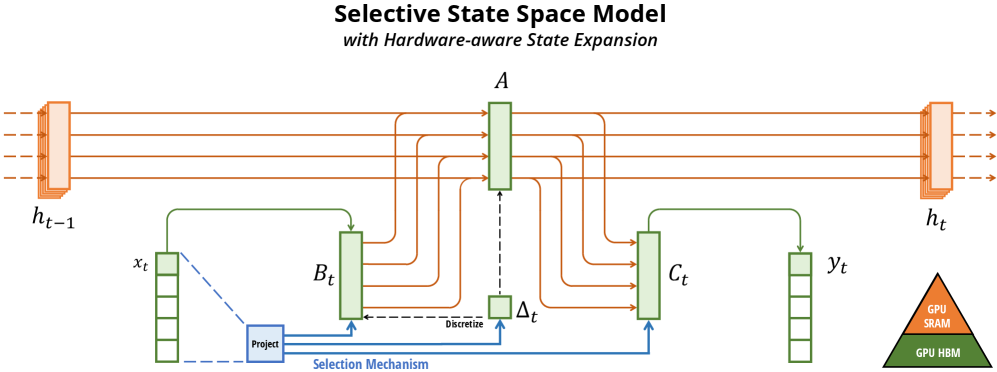


Never rewrite to relative paths like ./figures/x1.png — relative paths break on GitHub unless images are committed to the same repo.
Extracting Existing Inline URLs from Scraped Markdown
When port 3003 (Playwright) already embedded absolute URLs in the scraped markdown, extract them for the frontmatter catalog:
CORPUS_FILE="docs/research/corpus/2026-03-13-mamba-ssm.md"
Extract all absolute image URLs already in the markdown
grep -oE 'https://[^)]+.(png|jpg|svg|gif|webp)' "$CORPUS_FILE" | sort -u
These URLs are already inline — just copy them into the frontmatter figure_urls list.
Frontmatter for Image-Rich Papers
The YAML frontmatter catalogs all figure source URLs for provenance. The markdown body embeds them inline:
source_url: https://arxiv.org/html/2312.00752v2 scraped_at: "2026-03-13T00:00:00Z" scraper: firecrawl-port3003 tags: [ssm, state-space-model, mamba, sequence-modeling] content_tokens_approx: 4200 has_figures: true figure_count: 12 figure_urls:
- https://arxiv.org/html/2312.00752v2/x1.png
- https://arxiv.org/html/2312.00752v2/x2.png
- https://arxiv.org/html/2312.00752v2/x3.png
- https://arxiv.org/html/2312.00752v2/x4.png
- https://arxiv.org/html/2312.00752v2/x5.png
Corpus Index Entry with Figures
{ "url": "https://arxiv.org/html/2312.00752v2", "file": "corpus/2026-03-13-mamba-ssm.md", "scraped_at": "2026-03-13T00:00:00Z", "session": "2026-03-13-mamba-ssm", "scraper": "firecrawl-port3003", "has_figures": true, "figure_count": 12, "figure_urls": [ "https://arxiv.org/html/2312.00752v2/x1.png", "https://arxiv.org/html/2312.00752v2/x2.png" ] }
Port 3003 vs Jina Reader: Empirical Comparison (arXiv)
Validated on arXiv:2312.00752v2 (Mamba paper) — both scrapers running, same URL:
Scraper Bytes Lines Words Figures (absolute inline) Math on GitHub
Port 3003 (Firecrawl) 99,104 1,267 13,182 13 ✅ ❌ doubled Unicode+LaTeX, no $...$
Port 3002 (direct API) 99,104 1,267 13,182 13 ✅ (identical to 3003) ❌ doubled Unicode+LaTeX, no $...$
Jina Reader 84,832 596 10,761 12 ✅ ❌ doubled Unicode+LaTeX, no $...$
Pandoc from LaTeX source — — — via \includegraphics
✅ $inline$
mathblocks
Verdict: Firecrawl (port 3002/3003) gets 17% more bytes, 2.1× more lines, 22% more words, 1 extra figure vs Jina. Port 3002 and 3003 produce identical markdown (3003 just wraps 3002 and saves to Caddy). Both emit absolute inline figure URLs — no URL reconstruction needed from either scraper.
Note on the earlier session timeout: The March 2026 session failure was machine downtime (littleblack was offline), not a routing issue. When littleblack is up, port 3003 reaches arxiv.org fine.
Recommended arXiv workflow:
-
Port 3003 (preferred) — more complete content, figures inline, saves to Caddy
-
Jina Reader (fallback when littleblack is down) — 17% less content but still gets absolute figure URLs
-
Probe loop to build figure_urls frontmatter catalog regardless of scraper used
-
For human-readable math on GitHub: Pandoc from arXiv LaTeX source (see below)
Math Rendering: Empirically Validated Approaches
Validated on arXiv:2312.00752v2 (Mamba paper), March 2026.
Firecrawl/Jina Math Output: Unreadable on GitHub
Both Firecrawl (port 3002/3003) and Jina Reader extract math by doubling content — each equation appears as a Unicode render followed immediately by raw LaTeX source, packed into markdown table cells with \displaystyle prefixes and \bm{} escaping. Example from the empirical test:
| | h′(t)\displaystyle h^{\prime}(t) | =𝑨h(t)+𝑩x(t)\displaystyle=\bm{A}h(t)+\bm{B}x(t) | | (1a) |
No $...$ delimiters — GitHub cannot render this as math. The raw LaTeX portion is parseable by an LLM (equations are present), but the output is completely unreadable to humans on GitHub.
For LLM consumption: Firecrawl's doubled content is sufficient — the LaTeX source is embedded and an LLM can extract it.
For human-readable GitHub rendering: Use Pandoc from the arXiv LaTeX source tarball (see below).
Pandoc from arXiv LaTeX Source (Human-Readable Math)
Produces proper $inline$
and math
display blocks that GitHub's MathJax/KaTeX renders natively:
ARXIV_ID="2312.00752"
Download arXiv LaTeX source tarball
curl -L "https://arxiv.org/src/${ARXIV_ID}" -o "${ARXIV_ID}-src.tar.gz" mkdir -p "${ARXIV_ID}-src" tar xzf "${ARXIV_ID}-src.tar.gz" -C "${ARXIV_ID}-src/"
Find main .tex entry point and section files
ls "${ARXIV_ID}-src/".tex ls "${ARXIV_ID}-src/src/".tex 2>/dev/null # some papers put sections in src/
Option A: Convert individual section files (safer — avoids macro parse errors)
pandoc "${ARXIV_ID}-src/src/background.tex"
--to gfm+tex_math_dollars
--wrap=none
-o "${ARXIV_ID}-background.md"
Option B: Convert full main.tex (may fail on custom macros like \iftoggle)
pandoc "${ARXIV_ID}-src/main.tex"
--to gfm+tex_math_dollars
--wrap=none
-o "${ARXIV_ID}-pandoc.md"
Install: brew install pandoc . Works on any arXiv paper that publishes LaTeX source (most do).
Pandoc output quality (empirically validated):
-
Inline math: $x(t) \in \R \mapsto y(t) \in \R$ ✅ GitHub renders
-
Display math:
math\n\begin{align}\nh'(t) &= \A h(t) + \B x(t)\n\end{align}\n✅ GitHub renders -
Custom macros (\A , \B , \R , \dt , \dA , \dB ): ⚠️ undefined in KaTeX — macros pass through as-is and may partially fail on GitHub without the preamble's \newcommand definitions
Handling custom macros: Prepend the \newcommand block from main.tex preamble to the output:
Extract custom macro definitions from preamble
grep '\newcommand|\renewcommand|\def ' "${ARXIV_ID}-src/main.tex" > macros.tex
Pandoc does not read preamble macros — include them explicitly in a math block at the top:
echo 'math' > preamble-block.md cat macros.tex >> preamble-block.md echo '' >> preamble-block.md
cat preamble-block.md "${ARXIV_ID}-pandoc.md" > "${ARXIV_ID}-with-macros.md"
Known Pandoc parse errors on arXiv LaTeX:
Error trigger Cause Workaround
\iftoggle{arxiv}
Undefined toggle macro (etoolbox package) Convert section files instead of main.tex
\begin{figure*}
Two-column figure environment breaks structure Use head -N to avoid broken \end tags
\bm{} , \mathbf{}
Passes through — may not render in KaTeX Check paper's macro file for mappings
Anti-Patterns
Anti-Pattern Why It Fails Correct Approach
1 Using @mendable/firecrawl-js SDK jiti dynamic imports break in Bun Direct fetch() calls
2 Searching paywalled sites without waitFor
JS SPAs return empty shell Use waitFor: 3000 for IEEE, ACM DL
3 Setting depth > 5 Exponential query explosion, diminishing returns Cap at depth 5 (clampDepth() )
4 No timeout on fetch()
Hangs indefinitely on unreachable pages Always use AbortController with 15s timeout
5 Not trimming long page content Exceeds LLM context window trimToTokenLimit(text, 25_000) per page
6 Aborting on partial failure Loses all completed work Log failures, continue with remaining queries
7 Not checking Firecrawl health first Wastes time on queries that all fail GET /v1/health or test search before starting
8 Saving only synthesis without raw originals Loses source material, prevents re-analysis Always persist raw Firecrawl markdown to corpus
9
Rewriting figure URLs to local relative paths
Relative paths like ./figures/x1.png
break on GitHub — images don't render
Keep absolute URLs inline in markdown body ( ); catalog in frontmatter figure_urls
list — see Section 6
); catalog in frontmatter figure_urls
list — see Section 6
References
-
API Endpoint Reference — /v1/search and /v1/scrape contracts
-
Academic Paper Routing — Decision tree for paper sources
-
Recursive Research Protocol — Step-by-step recursive pattern
-
Corpus Persistence Format — Raw content archival format + directory layout
-
Self-Hosted Operations — Architecture, health checks, recovery
-
Self-Hosted Bootstrap Guide — Fresh installation guide
-
Self-Hosted Best Practices — Docker restart policies, monitoring
-
Self-Hosted Troubleshooting — Symptom-based diagnosis and recovery