🦞 Claw Body — Give Your Claw a Body

Every Claw deserves a body.
Turn your OpenClaw AI into a real-time digital avatar — with a face, a voice, and expressions. Talk to your Claw face-to-face, not just through cold text.
NEW: Presentation Mode 🎤 — Your Claw can now be a presenter! Load a PPT/PDF and let the avatar narrate your slides.
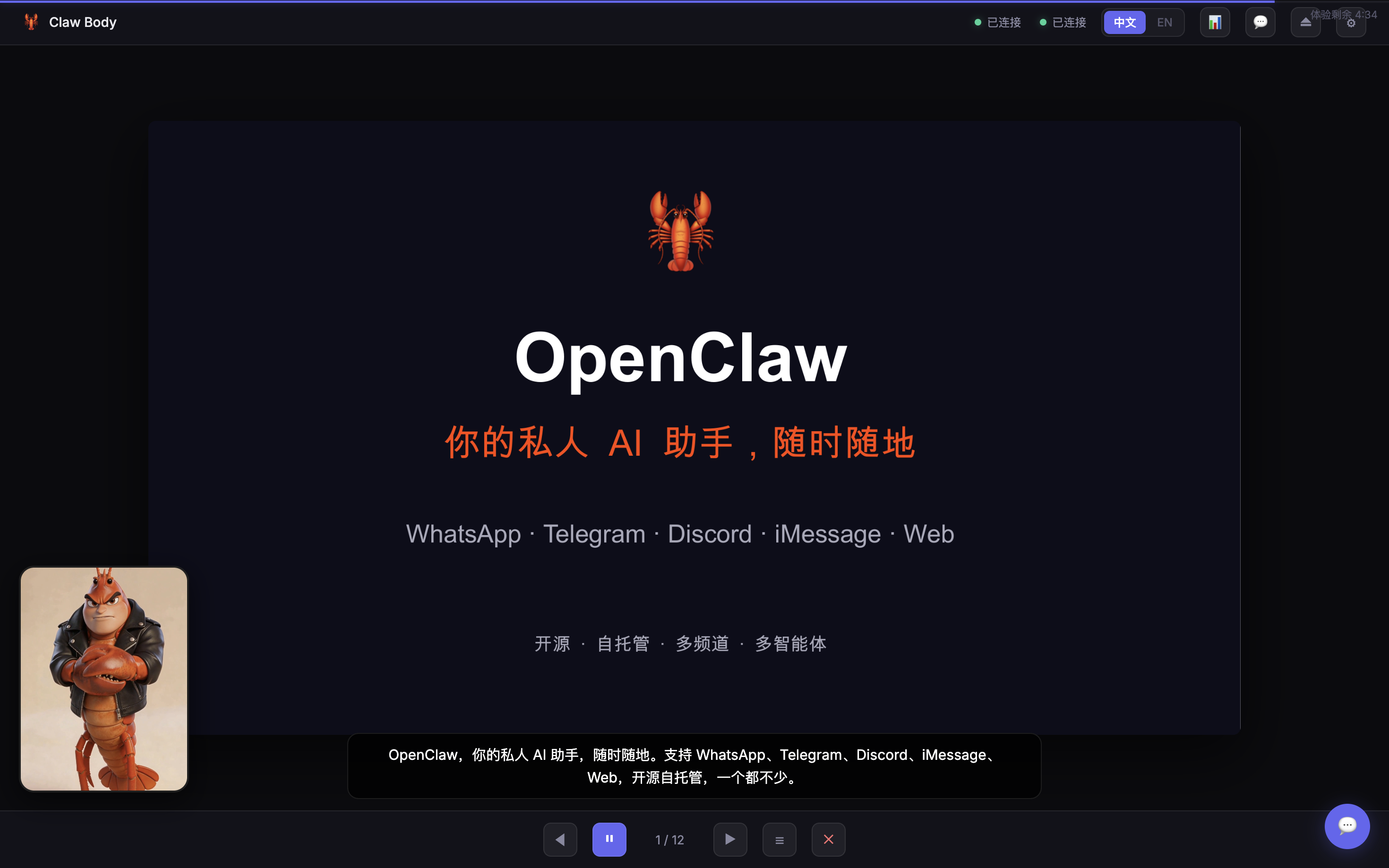
Free 5-minute trial included. Sign up at nuwaai.com to create your own custom avatar for free.
For Every Claw Fan
- 🎨 Design your dream Claw — cute, anime, realistic, handsome, beautiful, or buff — your call
- 🗣️ Voice chat — speak to your Claw and hear it talk back with lip-sync
- 📺 Real-time video — see your Claw's expressions as it responds
- 🧠 Same brain — it's your OpenClaw agent, just with a face. Same memory, same personality
- 🌐 中文 / English — bilingual interface with language toggle
- 📊 Presentation mode — narrate PPT/PDF slides with digital avatar (works with claw-presenter skill)
Quick Start
When user runs /claw-body:
-
Start the server:
node <skill-dir>/server.mjs -
Tell the user:
🦞 Claw Body is live: http://localhost:3099
Two options:
- Free trial — chat with the demo Claw for 5 minutes
- Your own avatar — sign up at nuwaai.com (free), create your dream look, then enter your API Key + Avatar ID + User ID
How It Works
You speak → ASR transcribes → OpenClaw agent replies → Avatar speaks with lip-sync
This skill uses NuwaAI's humanctrl mode with ASR:
- Your voice → NuwaAI speech recognition → text
- Text → OpenClaw Gateway → agent generates reply
- Reply → drives the avatar's voice and lip movements
Same agent, new interface. The avatar is just another channel — like iMessage or Telegram, but with a face.
Features
- 🎤 Real-time voice input (ASR)
- 🗣️ Lip-synced avatar speech
- 🧠 Same OpenClaw agent — not a separate bot
- 📺 WebRTC real-time video stream
- 💬 Text input fallback
- 📱 Auto-adapts to portrait / landscape / square avatars
- 🔧 In-browser config — zero env vars needed
- 🎁 Free 5-min trial with demo avatar
- 🌐 Chinese / English bilingual UI
- 🔄 Disconnect / reconnect controls
Create Your Own Avatar
- Go to nuwaai.com — sign up is free
- Create your avatar — first one is free!
- Get your API Key, Avatar ID, and User ID
- Enter them in the Claw Body interface
- Done — your Claw now has a body 🦞
Requirements
- OpenClaw Gateway running
- NuwaAI account (free sign-up)
- Modern browser (WebRTC + microphone)
- Node.js 18+
⚠️ When User Asks to Present PPT/PDF
If the user says anything like "讲PPT"、"讲解PDF"、"帮我讲解演示文件" while in Claw Body:
DO NOT open or operate any application (Keynote, PowerPoint, Preview) on the user's computer.
Instead, follow this flow:
- Ask for the file path if not provided
- Run the Claw Presenter parse script:
python3 <workspace>/skills/claw-presenter/scripts/parse-presentation.py "<file-path>" - Read the generated
presentation.json - For slides without scripts (
scriptis empty), generate narration based on content - Update
presentation.jsonwith the generated scripts - Tell the user the presentation is ready and ask to start
- When user confirms, reply with
[PRESENTATION_START:<output-dir>]to enter presentation mode - Narrate slide by slide using
[SLIDE:N]tags
📊 Presentation Mode (Slide Playback)
Claw Body supports a presentation mode for narrating pre-prepared slide decks.
Prerequisites
Use the Claw Presenter skill first to prepare a presentation folder:
<workspace>/presentations/<name>/
  presentation.json
  slides/001.png, 002.png, ...
Each slide in presentation.json has an image path and a script (narration text).
Entering Presentation Mode
When user wants to present a prepared folder, include this tag in your reply:
[PRESENTATION_START:<output-dir>]
Narrating Slides
For each page, read the script field from presentation.json and reply with:
[SLIDE:1]各位好,今天我来介绍一下我们的产品方案。
The frontend automatically flips to the corresponding slide image.
User Controls During Narration
- "继续" / "下一页" → advance to next slide
- "上一页" → go back
- "跳到第N页" → jump
- Any question → answer it, then user says "继续" to resume
- "退出讲解" → reply with
[PRESENTATION_END]
Control Tags
| Tag | Effect |
|---|---|
[PRESENTATION_START:<dir>] | Enter presentation mode |
[SLIDE:N] | Switch to slide N (1-indexed) |
[PRESENTATION_END] | Exit presentation mode |
Important
- Do NOT operate PPT/PDF applications on the user's computer — slides are shown in the browser
- Read narration from
presentation.jsonscriptfield — don't regenerate unless asked - Keep a natural speaking pace, one slide at a time
⚠️ First-Time Setup (Important!)
Claw Body talks to your OpenClaw agent via the Gateway's chat API. This endpoint is disabled by default and must be enabled once.
When user runs /claw-body:
- Read
~/.openclaw/openclaw.json - If
gateway.http.endpoints.chatCompletions.enabledis nottrue, tell the user to enable it manually:⚠️ 首次使用需要启用 AI 对话接口,在
~/.openclaw/openclaw.json中添加以下配置,然后重启 Gateway:openclaw gateway restart重启后刷新页面即可。以后不需要再操作了。
Add this to ~/.openclaw/openclaw.json:
{
  "gateway": {
    "http": {
      "endpoints": {
        "chatCompletions": { "enabled": true }
      }
    }
  }
}